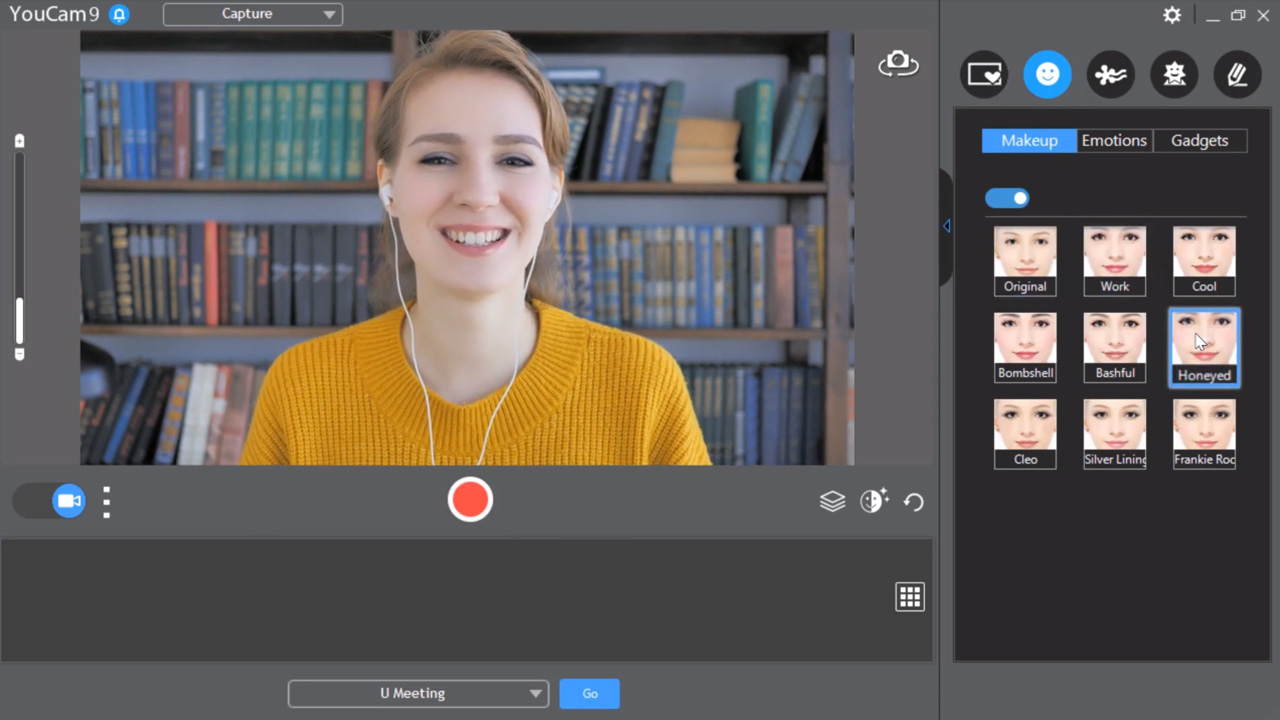
Ever stood in the middle of a crowded Sephora, swatching seventeen different shades of "nude" lipstick on your forearm until your skin looked like a bruised sunset? It’s messy. Honestly, it’s a little gross too, considering how many people touch those testers. This is exactly why YouCam Makeup became a permanent fixture on millions of smartphones.
It isn't just a selfie filter.
While most people lump it in with basic photo editors, the tech under the hood of YouCam Makeup is actually pretty sophisticated augmented reality. It’s developed by Perfect Corp., a company that basically pivoted from traditional software to become the undisputed heavyweight of "Beauty Tech." They aren't just making you look tan; they're mapping your face in 3D to see how light hits a specific brand of foundation.
You’ve probably seen the "Magic Selfie" ads. But the real story is how this app changed the way we actually buy stuff.
The Tech Behind the Virtual Mirror
Most apps just slap a static image over your face. YouCam Makeup uses something called Ageless and AI-powered AR. Essentially, it identifies over 200 different points on your facial structure in real-time. This is why when you turn your head, the eyeliner doesn't suddenly float off into your hair. It stays glued to your lid.
Perfect Corp. actually went public on the NYSE a while back, which tells you this isn't just some hobbyist project. They use a combination of deep learning and computer vision. If you’re wearing glasses, the app detects the frames and tucks the virtual eyeshadow behind them. That’s a level of detail most "fun" filters completely ignore.
Why Realism Matters More Than Beauty
When you're messing around with the app, you’ll notice brands like Estée Lauder or Benefit Cosmetics popping up. This is the "try-before-you-buy" economy. These brands pay a premium to ensure their specific shade of "Dragon Fruit" lipstick looks exactly like the physical product.
If the color is off by even 10%, the customer returns the product. That costs money. So, the app’s accuracy isn't just for your Instagram feed; it’s a logistical necessity for the global beauty industry.
Solving the "Skin Diary" Problem
One feature people often overlook—or find a bit creepy—is the Skin Score. YouCam Makeup uses your front-facing camera to analyze wrinkles, spots, texture, and dark circles.
Is it as accurate as a dermatologist with a magnifying lamp? No. Of course not.
But it provides a baseline. It tracks your skin over time. If you start a new serum and your "texture" score improves over three weeks, you have visual data to back up the $80 you just spent. It’s anecdotal, sure, but it’s a lot more helpful than just squinting in the bathroom mirror every morning wondering if your pores look smaller.
Critics often argue that these scores can fuel body dysmorphia. It’s a valid concern. When an app tells you that your skin is "65% healthy," it’s easy to obsess over the missing 35%. However, for users treating it as a fun progress tracker rather than a medical diagnosis, it’s a fascinating look at how AI views human aging.
The Rise of Men’s Grooming
Interestingly, the app has seen a spike in male users. No, they aren't all trying on lashes. They’re using the beard styles and hair color changers. Deciding whether to grow a goatee or dye your hair platinum is a high-risk move. Seeing a 3D render of yourself with a buzz cut before the clippers come out saves a lot of regret.
Dealing with the "Filter Dysmorphia" Trap
We have to talk about the elephant in the room. YouCam Makeup is very good at making you look... not like you.
The "Auto-Beautify" setting can be aggressive. It slims the jaw, enlarges the eyes, and deletes every pore. While it’s great for a quick profile picture, it creates a weird psychological gap between the screen and the mirror.
I’ve found that the best way to use the app is to dive into the settings and dial everything back to zero before starting. Use it as a tool for color theory—find out if you’re a "cool" or "warm" tone—rather than a tool for digital plastic surgery.
The app actually offers "Set to Natural" toggles now because the "uncanny valley" effect was becoming a deterrent for older users. People want to see a better version of themselves, not a blurry alien version of themselves.
Making the Most of the App Without Buying Premium
The subscription push in YouCam Makeup is intense. It’s everywhere. You’ll be clicking around and suddenly—BAM—a "Premium Only" pop-up for a specific glitter effect.
You don't actually need to pay to get the core value.
- Custom Palettes: You can manually input hex codes or select colors that match your favorite discontinued products.
- Lighting Control: There’s a slider that lets you change the lighting from "Office" to "Sunset." This is huge. Makeup that looks great in a dim bedroom looks insane in fluorescent office lighting. Use this.
- The Community Tab: Honestly, it’s a bit of a chaotic social network, but it’s great for seeing how colors look on people with your specific skin tone.
The Future: It’s Not Just Face Paint Anymore
Perfect Corp. is moving into jewelry and watches. Soon, YouCam won't just be about makeup; it’ll be about virtually trying on a Rolex or a pair of earrings. They’re using the same ear-tracking and wrist-tracking tech that they perfected on eyelashes.
It’s all part of the "V-commerce" (Virtual Commerce) trend. We’re moving toward a world where you never buy anything sight-unseen again.
Actionable Steps for New Users
If you’ve just downloaded the app or haven't opened it in a year, here is how to actually use it productively:
- Calibrate your lighting. Stand near a window. If the app can't see your features clearly, the AR will "jitter," and the lipstick will end up on your nose.
- Use the "Compare" button. There’s a tiny icon that lets you see the "Before" and "After" side-by-side. It’s the best way to realize you’ve gone way too far with the contouring.
- Check the brand names. Instead of just clicking "Red," look for the specific brand partnerships. Those are color-matched to real-world products you can find at Ulta or Sephora.
- Export in High Def. If you’re using it for content creation, go into the settings and ensure the export resolution is set to the max. The default is often lower to save space on your phone.
YouCam Makeup isn't going anywhere. It has survived the "filter fatigue" of the early 2020s because it transitioned from a toy to a utility. Whether you use it to find a new hair color or just to hide the fact that you haven't slept in three days before a Zoom call, the tech is undeniably impressive. Just remember to look in a real mirror once in a while.
The real you is usually doing better than the "Skin Score" suggests.
Next Steps for Mastery: To get the most realistic results, always clean your camera lens with a microfiber cloth before starting a session. Smudges on the lens create a "bloom" effect that confuses the AI's edge detection, leading to that fake, blurry look around the eyes. Once you’ve found a look you love, use the "Save Look" feature to create a personal library of styles you can overlay on any future photo in seconds.