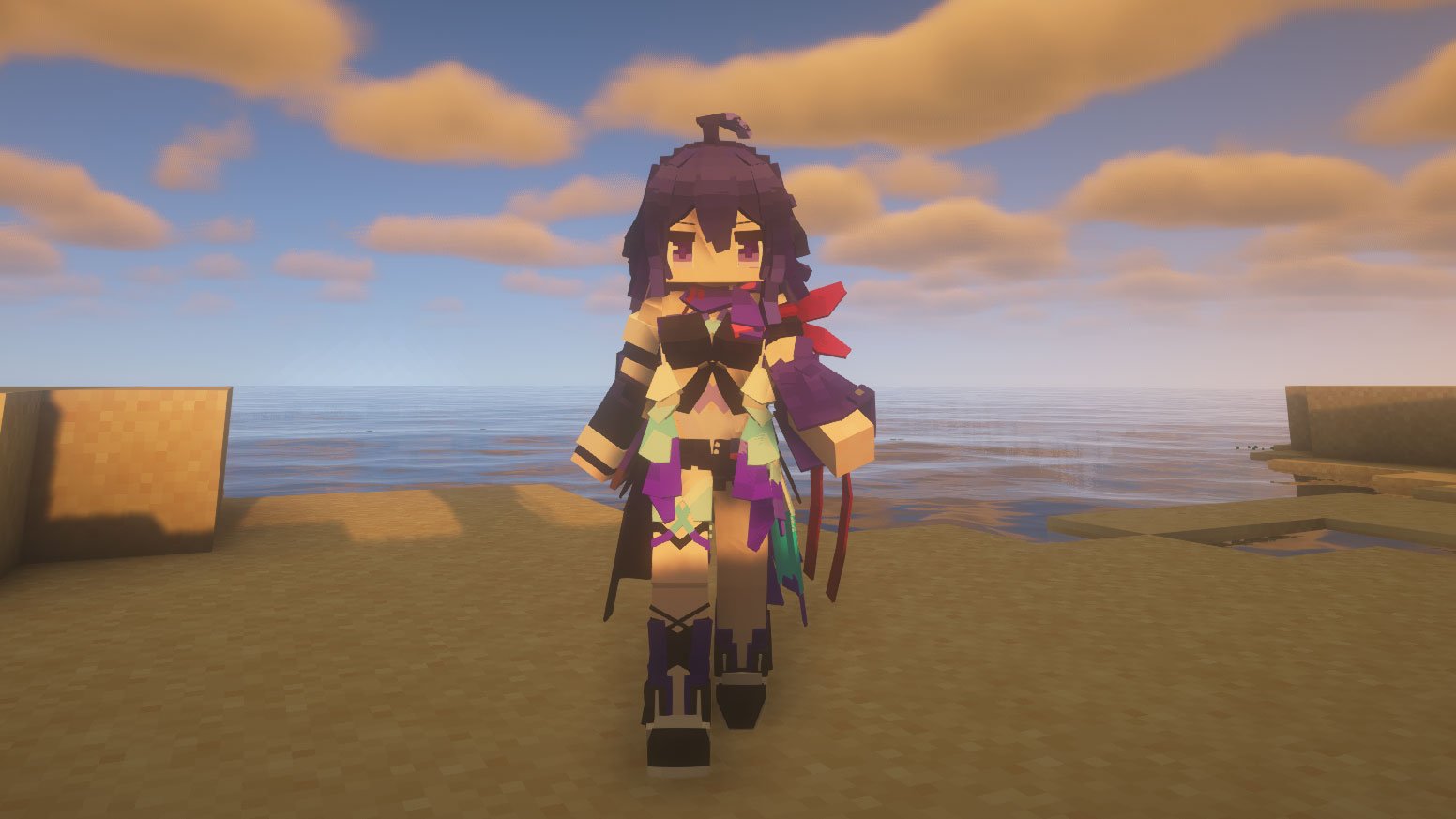
Ever get bored of looking at the same blocky dude? We've all been there. You spend hours building a literal empire, but your character still looks like they just rolled out of a 2011 survival trailer. Most people just slap on a new skin and call it a day. But some of us wanted more. We wanted actual 3D depth, custom animations, and maybe the ability to look like an anime protagonist or a mechanical soldier without the weird "box-arm" limitations of vanilla Minecraft.
That is exactly where the Yes Steve Model mod (often abbreviated as YSM) comes in.
Honestly, it’s one of those mods that feels like it shouldn't be possible in the Java Edition. It takes the rigid, low-poly player structure and basically throws it out the window. It replaces the default rendering system with something much more fluid—specifically borrowing logic and model styles from the Bedrock Edition—to allow for high-fidelity 3D models. You’re not just changing a texture; you’re changing the literal skeleton of your character.
What Most People Get Wrong About Yes Steve Model
A common misconception is that this is just another version of "Custom Player Models" (CPM) or "Figura." While they share a similar goal, the way YSM handles things is fundamentally different.
First off, YSM is built with servers in mind. If you’ve ever tried to use a complex player model mod on a multiplayer server, you know the pain. Usually, nobody else can see your cool dragon wings unless they also have the exact same file installed. YSM solves this with automatic client synchronization. When you join a server that has the mod, the server pushes the model files to your computer automatically.
It’s seamless.
Another huge thing is security. In the world of custom 3D modeling, people spend weeks—sometimes months—crafting a single character. Theft is a real problem. The creators of Yes Steve Model implemented encrypted binary files. This means if you create a custom model for your server, people can't just dig through their config folders and steal your hard work.
The Technical Wizardry Under the Hood
You might be wondering how it handles animations. It's not just "walking" and "jumping" anymore. This mod is compatible with a massive list of other popular mods, which is usually where these kinds of cosmetic mods break.
Check out how it interacts with these specific systems:
- Combat and Movement: It’s fully compatible with Better Combat and Parcool. If you’re doing a backflip or swinging a heavy claymore, the YSM model actually reflects those bones moving.
- Guns: If you use Timeless and Classics Zero (TACZ), you know the struggle of your arms clipping through the rifle. YSM has specific compatibility for aiming, reloading, and firing motions.
- Emotes: It supports a wide range of custom animations, including sitting (compatible with chair mods) and even complex emotes.
- Maids: For the Touhou Little Maid fans, YSM can actually replace the maid rendering models too.
Customization and the Blockbench Factor
If you aren't a coder, don't sweat it. Most people get their models from the community repo on GitHub or sites like FourthWall. You’ll see everything from "Sunflower Chibi" models to high-end Cyberpunk-style rigs.
But if you are the creative type, you use Blockbench. This is the industry standard for Minecraft modeling. You basically build your entity, set up the "bones" (locators), and export it. The mod looks for a specific folder structure: .minecraft/config/yes_steve_model/custom.
You drop your folder in there, hit Y in-game to open the menu, and boom—you’re no longer Steve.
The "Paywall" Controversy
We have to talk about the elephant in the room. Because YSM allows for such high-quality models, a "market" has popped up. You’ll find creators selling models for $2 to $25. Some players hate this, arguing it goes against the spirit of Minecraft modding.
Others argue that these are high-end digital assets, similar to VRChat avatars. Honestly, it’s a divide. If you just want a cool look, there are plenty of free models on the official GitHub. But if you want a custom-commissioned masterpiece with glowing eyes and 33 unique animations? Yeah, someone is probably going to charge you for that labor.
How to Get It Running Without Crashing Your Game
Installing Yes Steve Model isn't hard, but you have to be precise. It supports Forge, Fabric, and NeoForge, which is a rare trifecta.
- Match Your Versions: This is the #1 reason for crashes. If you’re on Minecraft 1.20.1, make sure your YSM version and your dependencies (like Oculus or Iris if you use shaders) are all synced up.
- The Config Folder: Don't put models in the
modsfolder. They go inconfig/yes_steve_model/custom. - In-Game Reload: You don't always have to restart the game. Use the command
/ysm model reloadto refresh your library while you're standing in the world.
One thing to watch out for: Armor Rendering. Because these models can be any shape—tall, short, or multi-armed—traditional Minecraft armor often looks goofy or just doesn't show up. Most YSM users prefer using "Cosmetic Armor" mods or just relying on the model's built-in textures.
Performance Reality Check
Does it lag? Sorta.
If you’re on a potato PC and you enter a server where 50 people are wearing 2MB high-poly models with PBR (Physically Based Rendering) textures, your frame rate is going to take a hit. However, the mod is surprisingly well-optimized. It uses Bedrock-style rendering logic which is generally more efficient than the old Java ways.
Actionable Steps for Your First Model
If you're ready to move past the default skin, here is your path forward:
- Download the Mod: Grab the latest version from Modrinth. It’s the most reliable source and avoids the weird "false positive" virus detections that plagued older versions on other sites.
- Visit the Repository: Go to the "Yes-Steve-Model-Repo" on GitHub. This is the "safe" place to find free, high-quality community models.
- Learn the Hotkey: The default key is
Y. This opens the GUI where you select your model, change textures, and trigger emotes. - Check Compatibility: if you use First-person Model mod, be aware there are still some rendering bugs there. It’s better to use a dedicated third-person mod like Better Third Person alongside YSM for the best experience.
Stop settling for 2D skins. Minecraft is a 3D game; your character should probably look the part. Whether you want to be a tiny chibi or a terrifying boss-style entity, YSM is the bridge that gets you there.