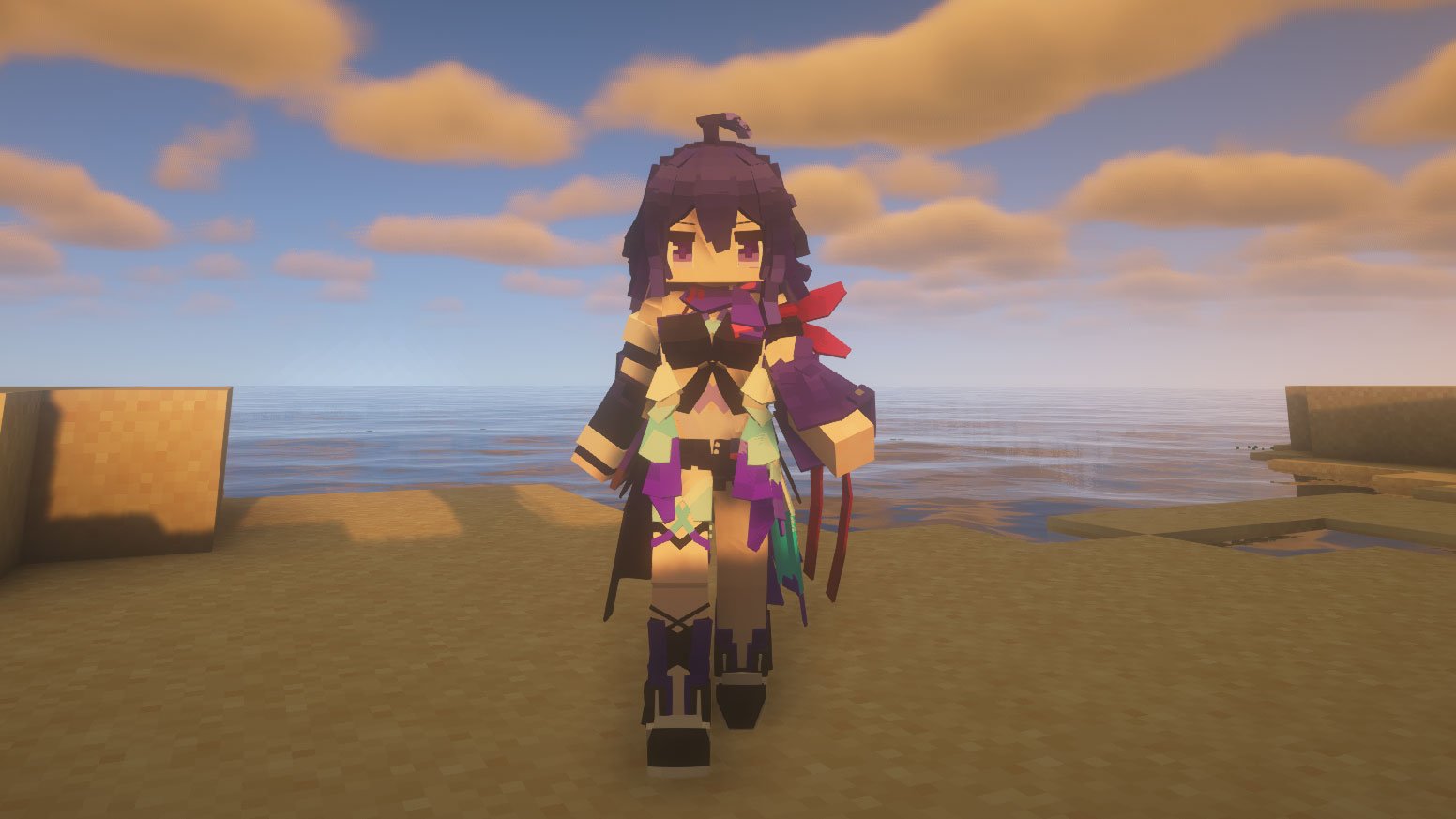
Minecraft used to be simple. You had a blocky guy, a flat texture, and maybe a cape if you were lucky enough to attend a convention. But things have changed. If you've spent any time on the modded side of the community recently, you’ve probably seen characters that look like they jumped straight out of an anime or a high-budget RPG. Usually, that’s because of the Yes Steve Model (YSM).
It’s a weird name for a mod, honestly. But it has basically taken over the roleplay and server scene. Unlike traditional skins that just wrap a 2D image around a box, YSM skins—or "models," as the pros call them—are full 3D assets. We’re talking custom skeletons, fluid animations, and bones that move in ways vanilla Minecraft simply can’t handle.
What is the Yes Steve Model anyway?
Think of it as a complete bypass of Minecraft’s rendering engine. It uses Bedrock Edition's model and animation logic but brings it to Java. It’s not just a cosmetic change; it’s a technical overhaul. You aren’t just wearing a skin; you are effectively replacing your player entity with a custom-built 3D model.
Most people use it for "waifu" skins—Genshin Impact characters, Azur Lane, that sort of thing. But it’s also used for incredibly detailed fantasy creatures or even just "buff Steve" models that make your character look like a bodybuilder. The mod handles the heavy lifting of syncing these models across a server so your friends can actually see you, provided they have the mod installed too.
Why everyone is switching to YSM
Vanilla skins are limited. You have a few pixels for a "second layer" on your head and torso. That’s it. With yes steve model skins, you get:
- Custom Emotes: Pressing a key (usually 'C' or 'Y' depending on your config) opens a wheel. You can wave, dance, or sit in a way that actually looks natural.
- Mod Compatibility: It works with stuff like Timeless and Classics Zero (TACZ). If you hold a gun, the model actually grips it correctly. If you use Parcool, your custom model will actually do the parkour animations instead of just glitching through the air.
- Encrypted Files: This is big for creators. If you make a custom model, the mod can encrypt it so people on a server can't just steal your file from their cache.
Getting the skins to actually work
It isn't as simple as dragging a PNG into a folder. You need a specific file structure. Typically, you're looking for a .ysm file or a folder containing a main.json and an arm.json. These files tell Minecraft how to stretch the texture over the 3D frame.
If you're looking for where to find these, the Elaina69 GitHub repository is basically the holy grail. It’s a massive community-driven archive where people dump models for everything from Genshin Impact to Elden Ring. You just download the folder, drop it into your config/yes-steve-model/custom directory, and you’re good to go.
The armor problem
Here is the catch. Because these models are custom shapes, vanilla armor usually won't fit. If you put on a diamond chestplate, it might just float five inches away from your chest. Or worse, it won't show up at all.
Smart creators build "custom armor" into the model itself. In the YSM menu, you can often toggle specific parts of the model to represent armor. But if you're playing a hardcore survival pack, be prepared for some visual weirdness. Some models have a setting to "prevent rendering of self player's model" to fix overlapping issues, which is a lifesaver.
Creating your own (if you're brave)
You don't need a PhD, but you do need Blockbench. Most creators start by importing the Bedrock geometry and then modifying it. You have to be careful with "locators"—these are invisible points that tell the mod where to hold an item or where the cape should hang.
If you mess up the parent-child relationship in the folder structure, your model will just be a "missing texture" purple-and-black checkerboard. It’s frustrating. But once you get that first custom arm animation working? It’s addictive.
Is it allowed on servers?
This is a gray area. On private servers or modded communities, it’s usually the highlight. On massive competitive servers like Hypixel? Be careful. While the skins themselves are client-side, some models can technically change your "visual" hitbox, even if your actual hitbox stays the same. Most big servers won't ban you just for having it installed, but if the mod causes a desync that looks like "reach" or "killaura" to their anti-cheat, you're toast.
Taking the next steps
If you're ready to move beyond the basic Steve look, start by grabbing the mod from Modrinth or CurseForge. Don't just look for "skins"—search for "YSM models" specifically.
- Check your version: Ensure your mod matches your Minecraft version (1.19.2 and 1.20.1 are the most stable for YSM right now).
- Visit the Repo: Head to the Elaina69 GitHub or the YSM Discord to find a model you actually like.
- Keybinds: Immediately go into your controls and find the YSM menu key. You'll need it to switch textures or trigger those custom emotes.
- Compatibility: If you want the full experience, install Oculus (for shaders) and Better Combat. Seeing a custom anime model perform a 360-degree sword spin with shaders is a completely different game.
Stop settling for flat textures. The tools are there, the models are free, and it makes the game feel like a modern title instead of something from 2011.